
6. Clustering
Clustering is sharing load between hosts. Each instance should be able to act as an entry point for UI and API access. This should enable Ascender administrators to use load balancers in front of as many instances as they wish and maintain good data visibility.
Note
Load balancing is optional and is entirely possible to have ingress on one or all instances as needed. The CSRF_TRUSTED_ORIGIN setting may be required if you are using Ascender behind a load balancer. See The CSRF_TRUSTED_ORIGIN setting for more detail.
Each instance should be able to join Ascender cluster and expand its ability to execute jobs. This is a simple system where jobs can and will run anywhere rather than be directed on where to run. Also, clustered instances can be grouped into different pools/queues, called Instance Groups.
6.1. Setup Considerations
This section covers initial setup of clusters only. For upgrading an existing cluster, refer to the Upgrade and Migration Guide.
Important considerations to note in the new clustering environment:
PostgreSQL is still a standalone instance and is not clustered. Ascender does not manage replica configuration or database failover (if the user configures standby replicas).
When spinning up a cluster, the database node should be a standalone server, and PostgreSQL should not be installed on one of Ascender nodes.
PgBouncer is not recommended for connection pooling with Ascender. Currently, Ascender relies heavily on
pg_notifyfor sending messages across various components, and therefore, PgBouncer cannot readily be used in transaction pooling mode.The maximum supported instances in a cluster is 20.
All instances should be reachable from all other instances and they should be able to reach the database. It is also important for the hosts to have a stable address and/or hostname (depending on how the Ascender host is configured).
All instances must be geographically collocated, with reliable low-latency connections between instances.
For purposes of upgrading to a clustered environment, your primary instance must be part of the
defaultgroup in the inventory AND it needs to be the first host listed in thedefaultgroup.Manual projects must be manually synced to all instances by the customer, and updated on all instances at once.
The
inventoryfile for platform deployments should be saved/persisted. If new instances are to be provisioned, the passwords and configuration options, as well as host names, must be made available to the installer.
6.2. Scaling the Web and Task pods independently
You can scale replicas up or down for each deployment by using the web_replicas or task_replicas respectively. You can scale all pods across both deployments by using replicas as well. The logic behind these CRD keys acts as such:
If you specify the
replicasfield, the key passed will scale both thewebandtaskreplicas to the same number.If
web_replicasortask_replicasis ever passed, it will override the existingreplicasfield on the specific deployment with the new key value.
These new replicas can be constrained in a similar manner to previous single deployments by appending the particular deployment name in front of the constraint used. More about those new constraints can be found below in the Assigning Ascender pods to specific nodes section.
6.3. Assigning Ascender pods to specific nodes
You can constrain the Ascender pods created by the operator to run on a certain subset of nodes. node_selector and postgres_selector constrains the Ascender pods to run only on the nodes that match all the specified key/value pairs. tolerations and postgres_tolerations allow the Ascender pods to be scheduled onto nodes with matching taints. The ability to specify topologySpreadConstraints is also allowed through topology_spread_constraints If you want to use affinity rules for your Ascender pod, you can use the affinity option.
If you want to constrain the web and task pods individually, you can do so by specifying the deployment type before the specific setting. For example, specifying task_tolerations will allow the Ascender task pod to be scheduled onto nodes with matching taints.
Name |
Description |
Default |
postgres_image |
Path of the image to pull |
postgres |
postgres_image_version |
Image version to pull |
13 |
node_selector |
Ascender pods’ nodeSelector |
‘’ |
web_node_selector |
Ascender web pods’ nodeSelector |
‘’ |
task_node_selector |
Ascender task pods’ nodeSelector |
‘’ |
topology_spread_constraints |
Ascender pods’ topologySpreadConstraints |
‘’ |
web_topology_spread_constraints |
Ascender web pods’ topologySpreadConstraints |
‘’ |
task_topology_spread_constraints |
Ascender task pods’ topologySpreadConstraints |
‘’ |
affinity |
Ascender pods’ affinity rules |
‘’ |
web_affinity |
Ascender web pods’ affinity rules |
‘’ |
task_affinity |
Ascender task pods’ affinity rules |
‘’ |
tolerations |
Ascender pods’ tolerations |
‘’ |
web_tolerations |
Ascender web pods’ tolerations |
‘’ |
task_tolerations |
Ascender task pods’ tolerations |
‘’ |
annotations |
Ascender pods’ annotations |
‘’ |
postgres_selector |
Postgres pods’ nodeSelector |
‘’ |
postgres_tolerations |
Postgres pods’ tolerations |
‘’ |
Example of customization could be:
---
spec:
    ...
    node_selector: |
      disktype: ssd
      kubernetes.io/arch: amd64
      kubernetes.io/os: linux
    topology_spread_constraints: |
      - maxSkew: 100
      topologyKey: "topology.kubernetes.io/zone"
      whenUnsatisfiable: "ScheduleAnyway"
      labelSelector:
        matchLabels:
            app.kubernetes.io/name: "<resourcename>"
    tolerations: |
      - key: "dedicated"
      operator: "Equal"
      value: "AWX"
      effect: "NoSchedule"
    task_tolerations: |
      - key: "dedicated"
      operator: "Equal"
      value: "AWX_task"
      effect: "NoSchedule"
    postgres_selector: |
      disktype: ssd
      kubernetes.io/arch: amd64
      kubernetes.io/os: linux
    postgres_tolerations: |
      - key: "dedicated"
      operator: "Equal"
      value: "AWX"
      effect: "NoSchedule"
    affinity:
      nodeAffinity:
      preferredDuringSchedulingIgnoredDuringExecution:
      - weight: 1
        preference:
            matchExpressions:
            - key: another-node-label-key
              operator: In
              values:
              - another-node-label-value
              - another-node-label-value
      podAntiAffinity:
      preferredDuringSchedulingIgnoredDuringExecution:
      - weight: 100
        podAffinityTerm:
            labelSelector:
              matchExpressions:
              - key: security
                operator: In
                values:
                - S2
            topologyKey: topology.kubernetes.io/zone
6.4. Status and Monitoring via Browser API
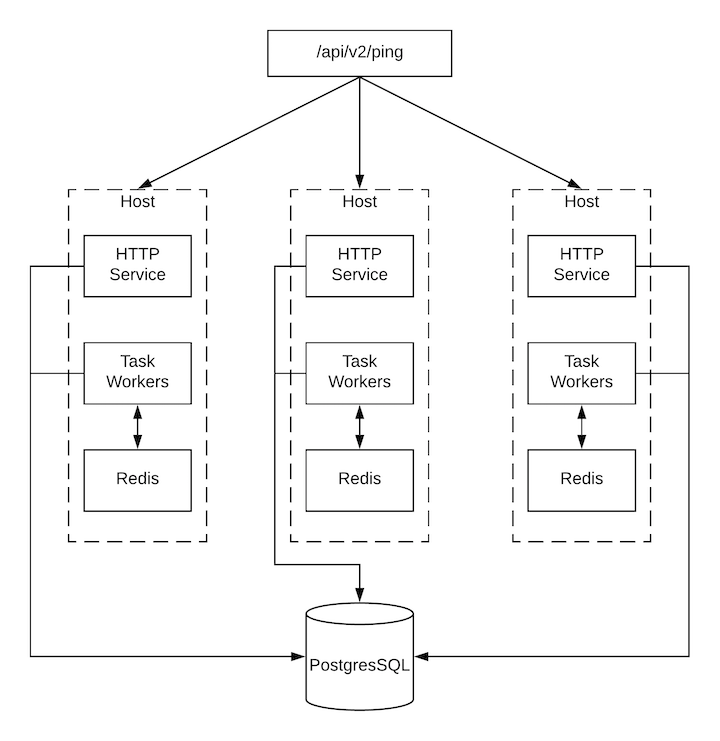
Ascender itself reports as much status as it can via the Browsable API at /api/v2/ping in order to provide validation of the health of the cluster, including:
The instance servicing the HTTP request
The timestamps of the last heartbeat of all other instances in the cluster
Instance Groups and Instance membership in those groups
View more details about Instances and Instance Groups, including running jobs and membership information at /api/v2/instances/ and /api/v2/instance_groups/.
6.5. Instance Services and Failure Behavior
Each Ascender instance is made up of several different services working collaboratively:
HTTP Services - This includes the Ascender application itself as well as external web services.
Callback Receiver - Receives job events from running Ansible jobs.
Dispatcher - The worker queue that processes and runs all jobs.
Redis - This key value store is used as a queue for event data propagated from ansible-playbook to the application.
Rsyslog - log processing service used to deliver logs to various external logging services.
Ascender is configured in such a way that if any of these services or their components fail, then all services are restarted. If these fail sufficiently often in a short span of time, then the entire instance will be placed offline in an automated fashion in order to allow remediation without causing unexpected behavior.
6.6. Job Runtime Behavior
The way jobs are run and reported to a ‘normal’ user of Ascender does not change. On the system side, some differences are worth noting:
When a job is submitted from the API interface it gets pushed into the dispatcher queue. Each Ascender instance will connect to and receive jobs from that queue using a particular scheduling algorithm. Any instance in the cluster is just as likely to receive the work and execute the task. If a instance fails while executing jobs, then the work is marked as permanently failed.
Project updates run successfully on any instance that could potentially run a job. Projects will sync themselves to the correct version on the instance immediately prior to running the job. If the needed revision is already locally checked out and Galaxy or Collections updates are not needed, then a sync may not be performed.
When the sync happens, it is recorded in the database as a project update with a
launch_type = syncandjob_type = run. Project syncs will not change the status or version of the project; instead, they will update the source tree only on the instance where they run.If updates are needed from Galaxy or Collections, a sync is performed that downloads the required roles, consuming that much more space in your /tmp file. In cases where you have a big project (around 10 GB), disk space on
/tmpmay be an issue.
6.6.1. Job Runs
By default, when a job is submitted to the Ascender queue, it can be picked up by any of the workers. However, you can control where a particular job runs, such as restricting the instances from which a job runs on.
In order to support temporarily taking an instance offline, there is a property enabled defined on each instance. When this property is disabled, no jobs will be assigned to that instance. Existing jobs will finish, but no new work will be assigned.